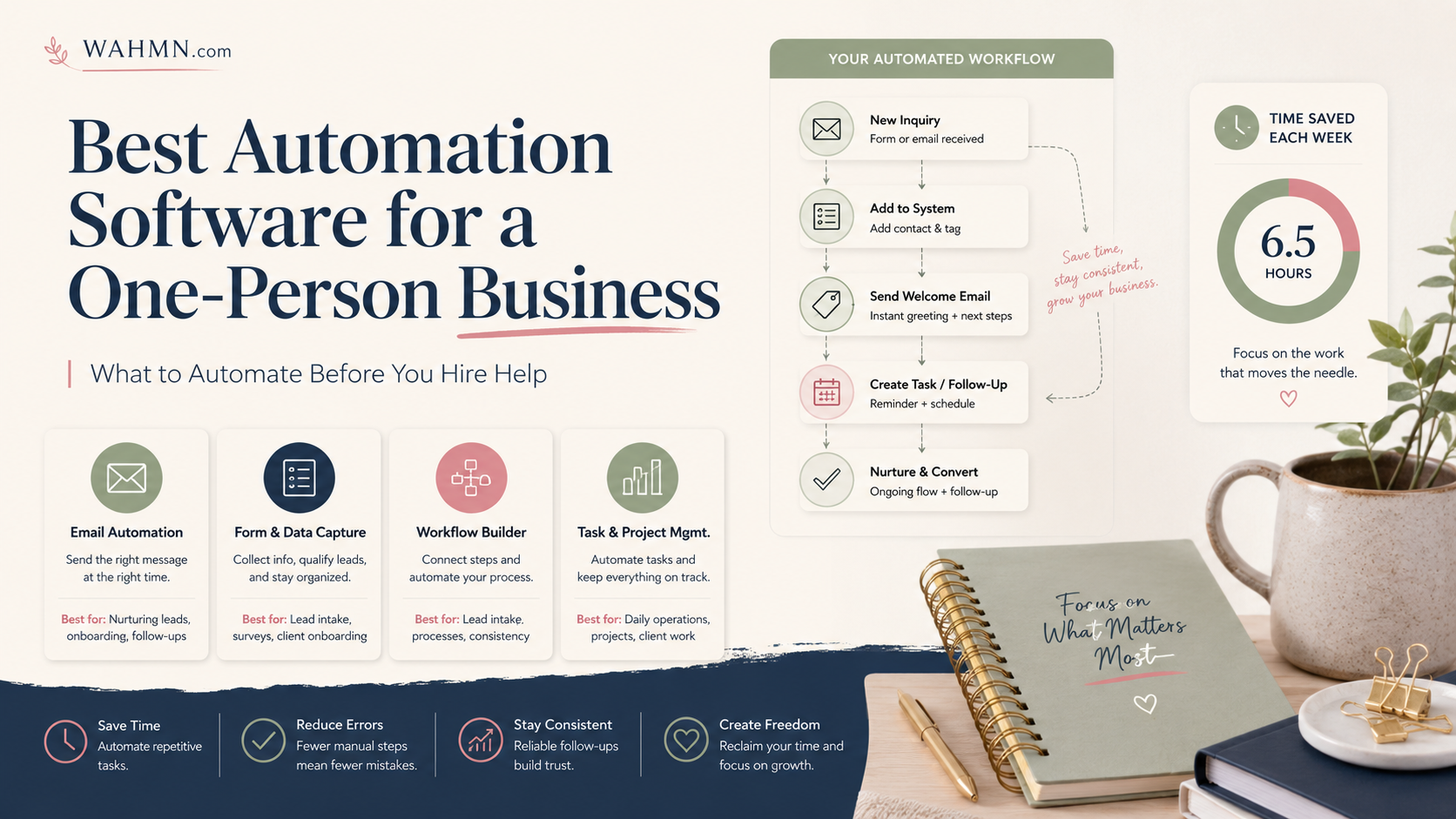
Best Automation Software for a One-Person Business: What to Automate Before You Hire Help
In this article
Running a company alone is an incredible feat, but your time is your most limited resource. Before you rush to hire contractors or full-time staff, you should look at your daily workflows. Implementing the best automation software for solopreneurs can help you reclaim hours spent on repetitive, low-value tasks.
This guide serves as a practical roadmap for United States business owners looking to scale efficiently. We will explore how to identify high-impact processes that keep your operations running smoothly without sacrificing the personal touch your clients love.
You will find a detailed comparison of industry leaders like Make, Zapier, and n8n, alongside emerging alternatives. We break down the costs, specific use cases, and implementation strategies to ensure you choose the right automation tools for one person business needs. Smart technology should empower your growth, not complicate your daily routine.
Key Takeaways
- Identify high-value tasks that drain your time before considering new hires.
- Use digital workflows to maintain customer relationships while scaling operations.
- Compare leading platforms like Zapier, Make, and n8n to find your perfect fit.
- Evaluate the true cost of implementation versus the value of saved hours.
- Focus on building systems that allow you to work on your business, not just in it.
Introduction
Choosing the best automation software for solopreneurs requires looking at your specific needs rather than just popularity. Every business operates differently, so one platform rarely fits every workflow perfectly. Instead of forcing a single tool onto your operations, we have identified category winners based on how you work.
Whether you are searching for the best automation software for small business tasks or a specialized tool for a one-person shop, your choice depends on your technical comfort. We evaluate four primary contenders: Zapier, Make, n8n, and current alternatives. Each offers a unique balance of ease, flexibility, and cost.
“Efficiency is doing things right; effectiveness is doing the right things.”
Zapier stands out for its incredible ease of use, making it perfect for beginners who want quick results. Make provides superior visual flexibility for those who enjoy building complex logic without deep coding knowledge. If you prioritize total control and data privacy, n8n is a powerful self-hosted option. Finally, current alternatives often provide cost-effective, niche solutions for specific platforms.
Consider these recommendations as provisional starting points for your journey. You should validate these tools against your actual monthly task volume and technical skills. By testing these platforms, you can find the perfect fit to help your business grow without the need for extra staff.
What a one-person business should automate
Building a lean business requires you to identify which daily chores can run on autopilot. When you handle every administrative task manually, you limit your capacity to focus on high-value creative work. Effective automation tools for solopreneurs allow you to reclaim hours of your week by handling predictable, rules-based processes.
Focus your efforts on tasks that consume your attention but require little judgment. These include capturing new leads from your website, sending appointment reminders, generating invoice notifications, and organizing digital files. By setting up these workflows, you ensure that your business runs smoothly even when you are away from your desk.
“The first rule of any technology used in a business is that automation applied to an efficient operation will magnify the efficiency. The second is that automation applied to an inefficient operation will magnify the inefficiency.”
To get started, look for workflows that feature clear triggers and predictable actions. You can easily connect your favorite platforms to create a seamless ecosystem:
- Lead Capture: Automatically sync form submissions from your site directly into your CRM.
- Client Communication: Trigger personalized follow-up emails immediately after a discovery call.
- Financial Tracking: Update your spreadsheets automatically whenever a payment hits your bank account.
- Scheduling: Sync new bookings from your calendar to your project management software.
Choosing the best automation software for solopreneurs is about finding tools that bridge the gap between your existing apps. Prioritize systems that offer measurable time savings, such as reducing manual data entry or eliminating back-and-forth scheduling emails. Remember, the goal is to build a robust infrastructure that supports your growth before you commit to the costs of hiring human help.
What not to automate yet
While technology is powerful, some parts of your business require a human touch. Workflow automation for small business is a fantastic tool for efficiency, but it should never replace your unique voice or critical thinking. If you rush to automate before you fully understand your own processes, you risk losing the personal connection that makes your brand special.
You should keep sensitive or brand-defining tasks manual until you have established reliable patterns. For example, complex customer complaints or high-stakes strategic decisions require your direct attention. Automating these areas too early can lead to cold, robotic responses that damage your hard-earned reputation.
Consider the following areas where human judgment is non-negotiable. These tasks define your relationship with your clients and ensure your business maintains its quality standards.
| Task Category | Why Keep It Manual | Risk of Automation |
|---|---|---|
| Customer Complaints | Requires empathy and nuance | Appearing dismissive or uncaring |
| Strategic Decisions | Needs long-term vision | Missing market shifts |
| Custom Proposals | Requires tailored solutions | Generic, unconvincing offers |
| Relationship Building | Needs authentic connection | Loss of personal trust |
Effective workflow automation for small business works best only after you have documented your processes and identified all potential exceptions. If you cannot explain a task to a human, you cannot teach a machine to do it correctly. Protecting your trust and reputation is far more important than saving a few minutes on a task that requires your personal expertise.
Start by automating repetitive, low-risk administrative chores first. Once you have mastered those, you can slowly evaluate which other areas might benefit from software. Always prioritize the human element in your business to ensure long-term success.
Evaluation criteria
Finding the best automation software for small business starts with knowing what to measure. Many owners get distracted by long lists of features, but the true value lies in how well a tool fits your daily operations. You should prioritize platforms that offer a balance between power and ease of use.
When you look at workflow automation for small business, focus on the total value of the system rather than just the number of advertised integrations. A platform with five hundred connections is useless if you cannot figure out how to link them together. Ask yourself: can I build, monitor, and repair these automations without hiring an expensive developer?
Reliability and debugging are just as important as the initial setup. You need a system that alerts you when a task fails so you can fix it quickly. If the software hides errors or makes them impossible to find, you will spend more time troubleshooting than actually running your business.
Consider how the platform handles your data and permissions. As a solo owner, you need to ensure that your customer information remains secure while moving between apps. A good tool provides clear logs and simple controls to manage these connections safely.
Use the following table to compare potential tools against your specific needs. This framework helps you decide if a platform is truly the best automation software for small business for your unique situation.
| Criteria | What to Look For | Why It Matters |
|---|---|---|
| Setup Difficulty | Drag-and-drop interface | Saves time for non-technical users |
| Reliability | Uptime and error alerts | Prevents lost leads or missed orders |
| Debugging | Clear error logs | Makes fixing broken workflows easy |
| Data Handling | Secure encryption | Protects sensitive client information |
| Support | Helpful documentation | Reduces frustration during learning |
Comparison table
Finding the best automation software for solopreneurs requires a clear look at your options. When you manage everything yourself, you need automation tools for one person business workflows that save time without adding complexity.
The following table provides a high-level overview of the top platforms. Use this to identify which tool aligns with your current technical skills and operational needs.
| Tool | Ease of Use | Visual Design | Hosting | Free Plan | Best For |
|---|---|---|---|---|---|
| Make | Moderate | Excellent | Cloud | Yes | Visual Builders |
| Zapier | High | Good | Cloud | Yes | Quick Setup |
| n8n | Low | Good | Self/Cloud | Yes | Developers |
| Alternatives | Varies | Varies | Varies | Varies | Specific Needs |
Please note that pricing tiers, feature limits, and integration availability change frequently. Always verify the current terms on the provider’s official website before making a purchase decision.
Selecting the best automation software for small business success depends on your specific goals. While some tools prioritize speed, others offer deeper control for complex tasks.
Make
For those seeking granular control, Make stands out among the best automation software for solopreneurs. Unlike simpler platforms, this tool provides a visual canvas where you can map out exactly how your data moves from one app to another. It is perfect for business owners who prefer to see the big picture of their operations in real-time.
The platform shines through its visual scenario builder, which allows you to create complex, multi-step workflows with ease. You can use branching logic to tell your system exactly what to do when specific conditions are met. By utilizing filters and routers, you ensure that your data only travels down the path you define. Setting these systems up for other people pays better than using them yourself, covered in making an AI automation business.
“Complexity is the enemy of execution, but with the right visual tools, you can turn chaos into a streamlined engine for growth.”
Many automation tools for solopreneurs offer basic triggers, but Make goes further by letting you manipulate data at every single step. This level of precision is a major advantage for those who need to integrate niche software or handle custom data formats. While it offers great cost efficiency, it does require a bit more time to learn the ropes.
Because the system is so powerful, it is best suited for owners who are willing to invest time in careful operation planning. You will need to understand how your data fields map across different services to get the most out of your setup. Once you master the interface, you gain a level of operational freedom that is hard to match elsewhere.
Zapier
When looking for the best automation software for small business, Zapier often appears at the top of the list for its ease of use. It serves as a beginner-friendly platform that connects your favorite apps through simple triggers and actions. This makes it one of the most popular automation tools for solopreneurs who need to save time without writing a single line of code.
The platform relies on a straightforward interface that allows you to build workflows in minutes. You can choose from thousands of pre-made templates to automate repetitive tasks like saving email attachments or updating spreadsheets. Speed and accessibility are the primary reasons many solo owners choose this path.
While the convenience is unmatched, you should keep a close eye on your task usage. As your business grows, the cost of premium apps and multi-step workflows can add up quickly. It is important to distinguish between the immediate convenience of a quick setup and the long-term financial impact on your budget.
Consider these key factors when evaluating Zapier as one of your primary automation tools for solopreneurs:
- Broad App Coverage: It connects with almost every major software platform available today.
- User-Friendly Interface: You do not need technical skills to create complex, multi-step automations.
- Task Limits: Monitor your monthly usage to avoid unexpected charges as you scale.
- Premium App Access: Some integrations require a paid subscription, which is a common trait of the best automation software for small business.
Ultimately, Zapier is an excellent starting point for anyone who values simplicity and reliability. By automating the small, tedious parts of your day, you gain the freedom to focus on high-value tasks that drive your revenue forward.
n8n
Workflow automation for small business often hits a wall when you need custom code, but n8n breaks those barriers. This platform is designed for users who want deeper customization and flexible data handling. If you find standard no-code actions too limiting, this tool provides the logic and control you need to build complex systems.
The true power of n8n lies in its ability to integrate custom JavaScript steps directly into your workflows. You can manipulate data in ways that drag-and-drop interfaces simply cannot match. For a technically comfortable solo operator, this level of control is a game-changer for efficiency.
However, this power comes with significant responsibilities. When you choose to self-host your workflow automation for small business, you become the IT department. You must manage security, perform regular updates, handle backups, and troubleshoot any server-side issues that arise.
If you prefer a “set it and forget it” approach, the overhead of maintaining your own instance might feel like a burden. For those seeking the simplest possible setup, the time spent on server maintenance could be better spent on growing your business. Carefully weigh your technical skills against your desire for total system ownership before diving in.
| Feature | n8n | Standard No-Code |
|---|---|---|
| Custom Code | Full JavaScript Support | Limited/None |
| Hosting | Self-hosted or Cloud | Cloud Only |
| Maintenance | High (Manual) | Low (Managed) |
| Data Control | Complete Ownership | Platform Dependent |
Current alternative
Your search for the perfect system should include evaluating emerging alternatives alongside established market leaders. While popular platforms often grab the headlines, automation tools for one person business can vary significantly in their underlying architecture and user experience.
When you assess a new platform, look closely at the interface and the depth of its integrations. A tool might look great on the surface, but it must connect seamlessly with your existing tech stack to be truly effective. Reliability is non-negotiable, so prioritize platforms that offer stable uptime and responsive customer support.
Selecting the best automation software for small business requires a clear understanding of your actual workflows and expected data volume. Consider these factors before committing to a subscription:
- Technical Maintenance: Are you comfortable managing self-hosted solutions, or do you prefer a fully managed cloud service?
- Pricing Model: Does the cost scale linearly with your usage, or does it jump significantly as you add more tasks?
- Workflow Complexity: Does the platform handle simple linear triggers, or does it support complex conditional logic?
Always remember that software features and pricing structures change frequently. Before you sign up, verify the current plan limits and specific product capabilities on the provider’s official website. Your business needs are unique, so choose a tool that aligns with your specific growth trajectory rather than just following the crowd.
Ultimately, the right choice depends on your personal tolerance for technical setup versus your need for immediate, out-of-the-box functionality. By testing these automation tools for one person business against your specific requirements, you ensure that your best automation software for small business choice remains a long-term asset rather than a source of frustration.
Apples-to-apples cost example
Choosing the best automation software for small business requires a clear look at how different platforms handle your specific needs. To make an informed decision, you should test each tool against the exact same workflow. This method removes the guesswork and helps you see the true value of your investment.
Imagine a standard process for a solo entrepreneur: a lead fills out a form on your website. The system must then add that contact to your CRM, send a personalized welcome email, and create a follow-up task in your project manager. When you apply this identical scenario to various platforms, the differences in pricing models become very clear.
“Automation is not just about saving time; it is about creating a reliable system that allows your business to scale without your constant manual intervention.”
When evaluating workflow automation for small business, you must look beyond the advertised entry price. Some platforms charge per task, while others charge per operation or step. You need to estimate your monthly volume to understand which plan actually fits your budget for dependable, daily use.
The following table illustrates how these platforms might handle a single lead-capture workflow based on 100 leads per month. Please confirm current pricing on official websites before making a final purchase, as plans change frequently.
| Platform | Primary Cost Metric | Estimated Monthly Usage | Likely Plan Tier |
|---|---|---|---|
| Zapier | Tasks per month | 400-500 tasks | Starter Plan |
| Make | Operations per month | 400-500 operations | Core Plan |
| n8n | Workflows/Execution | Unlimited/Self-hosted | Cloud Starter or Free |
Always remember that your needs will grow as your business expands. A plan that seems affordable today might become expensive if your lead volume triples. Focus on finding a tool that offers a clear path for scaling your operations without unexpected costs.
Best by scenario
Finding the best automation software for solopreneurs requires matching your technical skills with your business goals. You must consider your current workflow complexity, your daily task volume, and your personal willingness to troubleshoot technical issues. What works for a high-volume ecommerce seller might be overkill for a local service provider.
If you prioritize speed and ease of use, you likely need a platform that favors no-code visual builders. Conversely, if you enjoy technical control and want to minimize monthly subscription costs, self-hosted solutions offer a powerful alternative. The right automation tools for one person business operations should grow alongside your revenue rather than creating a bottleneck.
Consultants and coaches often benefit from simple, linear workflows that handle lead intake and scheduling. In contrast, agencies and ecommerce sellers require robust, multi-step logic that connects inventory, shipping, and customer relationship management systems. Choosing the right path ensures you spend less time managing software and more time serving your clients.
| Business Type | Primary Need | Recommended Approach |
|---|---|---|
| Consultants | Lead capture & scheduling | Fast, beginner-friendly SaaS |
| Ecommerce Sellers | Inventory & order sync | High-integration variety |
| Content Creators | Social media distribution | Visual, low-maintenance tools |
| Local Services | Client communication | Reliable, set-and-forget logic |
| Agencies | Complex data processing | Self-hosted or advanced logic |
Ultimately, the best automation software for solopreneurs is the one you actually maintain. If a tool is too complex, you will likely abandon your workflows entirely. Start with automation tools for one person business that solve your most painful bottleneck today, then expand your stack as your confidence grows.
Starter automation stack
A lean automation stack acts as the digital backbone for your one-person business. By integrating your core systems, you eliminate manual data entry and reduce the risk of human error. The best automation tools for solopreneurs allow you to connect essential platforms without needing a complex technical infrastructure.
To build a functional foundation, focus on these seven core areas:
- Email and Calendar: Sync your scheduling to avoid double bookings.
- Forms and CRM: Capture lead data directly into your customer records.
- Payments and Accounting: Trigger invoices automatically upon project completion.
- Cloud Files: Organize client assets in shared folders without manual sorting.
Effective workflow automation for small business starts with a single, high-frequency task. Choose a process you perform daily, such as onboarding a new client or sending a follow-up email. Document the specific trigger, like a new form submission, and the expected result, such as a folder creation and a welcome message.
“The secret to successful automation is to start small, document your process, and ensure your systems talk to each other before you scale.”
Once your first workflow is live, always add error notifications. These alerts notify you immediately if a connection fails, allowing you to fix the issue before it impacts your clients. This proactive approach ensures your automation tools for solopreneurs remain reliable and easy to maintain over time.
By prioritizing dependable handoffs between your apps, you create a visible record of every transaction. This level of workflow automation for small business saves you hours each week. You gain the freedom to focus on high-value work rather than repetitive administrative chores.
Decision tree
Navigating the world of workflow automation for small business requires a simple, logical approach. Before you commit to a monthly subscription, you must identify the specific needs of your daily operations. Start by asking yourself if your tasks require complex branching logic or if they are simple, linear sequences.
If you handle sensitive client data or require deep integration with custom databases, you need automation tools for one person business that offer high security and flexibility. Conversely, if you just need to move data between two apps, a low-maintenance, user-friendly platform is your best bet. Use the following checklist to narrow your search:
- Branching Logic: Do you need “if-this-then-that” scenarios with multiple outcomes?
- Custom Code: Will you need to write JavaScript or Python to bridge gaps between apps?
- Data Sensitivity: Does your industry require self-hosting for better control over your information?
- Ease of Use: Do you prefer a visual, drag-and-drop interface over a text-based configuration?
Once you define these requirements, you can filter your options by technical capability rather than just price. Many entrepreneurs make the mistake of choosing a tool based on a low entry price, only to find it lacks the essential features needed for their specific growth stage. Always prioritize functionality that solves your current bottleneck.
The most effective way to choose workflow automation for small business is to test one real, high-impact task. Instead of reading endless feature lists, sign up for a trial and build a single, functional workflow. This hands-on experience will tell you more about the automation tools for one person business than any comparison chart ever could.
When to upgrade from free
Deciding when to pay for software is a major milestone for any growing business. While free tiers are excellent for testing, they often become a bottleneck as your operations expand. Choosing the right automation tools for one person business requires balancing your current budget against the potential for future growth.
You should consider an upgrade when your free plan hits consistent limits. Common signs include reaching your monthly task cap, experiencing delayed execution times, or lacking access to premium integrations that your workflow requires. If you find yourself manually fixing errors or missing lead handoffs, the cost of the free plan is likely higher than a monthly subscription.
The best automation software for solopreneurs provides value by reclaiming your time and reducing manual labor. Before you commit to a paid plan, ensure your workflow is stable and necessary. Upgrading should be a strategic decision based on measurable results rather than a desire for extra features.
Use this checklist to confirm if you are ready to upgrade:
- Workflow: The process runs reliably and solves a specific problem.
- Time Savings: You can quantify the hours saved per week by automating this task.
- Financial Justification: The cost of the subscription is lower than the value of the time you reclaim.
- Scalability: The current free limits are actively preventing you from taking on more clients.
The following table helps you compare the risks of staying on a free plan versus the benefits of moving to a paid tier.
| Factor | Free Plan Limitation | Paid Plan Advantage |
|---|---|---|
| Task Volume | Strict monthly caps | High-capacity scaling |
| Execution Speed | Delayed or batch runs | Instant, real-time triggers |
| Integrations | Basic apps only | Full premium ecosystem |
| Data History | Limited logs | Extended audit trails |
Avoid subscription creep
Subscription creep can quietly drain your bank account if you aren’t careful with your automation stack. As a solo operator, it is easy to sign up for multiple automation tools for one person business without realizing how the monthly fees add up. Over time, these small charges create a significant burden on your bottom line.
To prevent this, you should maintain a simple integration inventory. List every app you pay for and note exactly which workflows rely on them. If you find a tool that only handles one minor task, consider if that task is truly worth the monthly cost.
Perform a monthly usage review to identify unused seats or duplicate workflows. If you have abandoned scenarios that no longer serve your business, delete them immediately. The best automation software for small business is not necessarily the platform with the largest feature list, but the one that supports your essential work efficiently.
Focus on the cost per completed business outcome rather than just the sticker price of a subscription. If an expensive tool saves you ten hours of manual labor per week, it is a smart investment. However, if you pay for premium features you never use, it is time to consolidate your tools.
| Habit | Impact on Budget | Recommended Action |
|---|---|---|
| Ignoring unused seats | High waste | Audit monthly |
| Overlapping platforms | Redundant costs | Consolidate tools |
| Paying for premium tiers | Low ROI | Downgrade to essential |
| Documenting workflows | High efficiency | Maintain inventory |
FAQs
Selecting the right automation tools for one person business requires a clear focus on repetitive, rules-based tasks. You should keep sensitive judgment and relationship-building work in your own hands. This approach ensures your personal touch remains the core of your brand.
Many solopreneurs ask which platform is easiest for beginners. Zapier often wins for its user-friendly interface and vast library of integrations. If you prefer total control and lower costs at scale, n8n offers a powerful self-hosted option. You might choose Make for its visual builder that handles complex logic with ease.
Self-hosting makes sense when your volume grows and you want to avoid per-task pricing. You should start by automating simple data entry or email notifications. Always compare free plans by checking task limits and available app connections before you commit.
The best automation software for solopreneurs is the one that saves you time without adding unnecessary complexity. Define your workflow, test a single process, and measure the results. Upgrade your subscription only when the value becomes clear to your bottom line.
Verify current pricing, integration limits, and data-handling terms for your chosen platform in the United States. Taking these steps protects your budget and keeps your operations running smoothly. Your path to efficiency starts with one small, automated win today.
Which platform is the easiest for beginners just starting with automation?
When does self-hosting an automation tool like n8n make sense?
What are the first tasks a solopreneur should look to automate?
How can I compare free plans between Make, Zapier, and n8n?
When is the right time to upgrade from a free plan to a paid subscription?
Will using automation tools make my small business feel impersonal to my customers?
How do I avoid “subscription creep” when setting up my automation stack?
Keep reading on WAHMN
More articles in this category, browse the full article library, or explore our business tools and learning paths.
The tool matters less than what you automate with it. AI Advantage covers deciding that, and Business Launcher covers putting the time you save back into growth.