Kit vs. MailerLite for a New Online Business: Which Should You Start With?
Starting a new online business in the United States requires the right tools to connect with your audience. Choosing between Kit vs MailerLite often feels overwhelming because both platforms offer powerful features for creators and small brands.
We will evaluate these services based on pricing, ease of use, and essential marketing features. Our goal is to help you decide which platform aligns best with your specific growth strategy.
While both options are excellent, the right choice depends on your unique business goals and how you plan to sell your products. Whether you prioritize advanced automation or simple email design, understanding these differences will save you time and money as you scale.
Key Takeaways
- Both platforms provide robust tools for building an email list from scratch.
- Pricing structures differ significantly based on your subscriber count and feature needs.
- Ease of use is a primary factor for new business owners with limited technical skills.
- Automation capabilities vary, impacting how you nurture your leads over time.
- Your choice should reflect your long-term vision for product sales and audience engagement.
Introduction
If you are short on time, here is the quick answer to the MailerLite vs Kit debate. Both platforms are excellent, but they serve different types of creators and business owners.
If you prioritize visual design and want an all-in-one tool that feels intuitive from day one, MailerLite is likely your best choice. It offers a drag-and-drop editor that makes building beautiful newsletters feel effortless for beginners.
However, if your primary goal is to grow a newsletter and sell digital products through automated funnels, Kit is the superior option. It focuses heavily on the creator economy and simplifies the process of turning subscribers into paying customers.
To help you make your final decision, consider these three main factors:
- Ease of Use: MailerLite wins for those who want a simple, visual interface.
- Marketing Focus: Kit is built specifically for creators who sell digital goods.
- Scalability: Both tools handle growth well, but they approach automation from different angles.
Ultimately, the right choice in the MailerLite vs Kit comparison depends on whether you value design flexibility or specialized sales features. Take a moment to define your immediate needs before you commit to a platform.
At-a-glance comparison
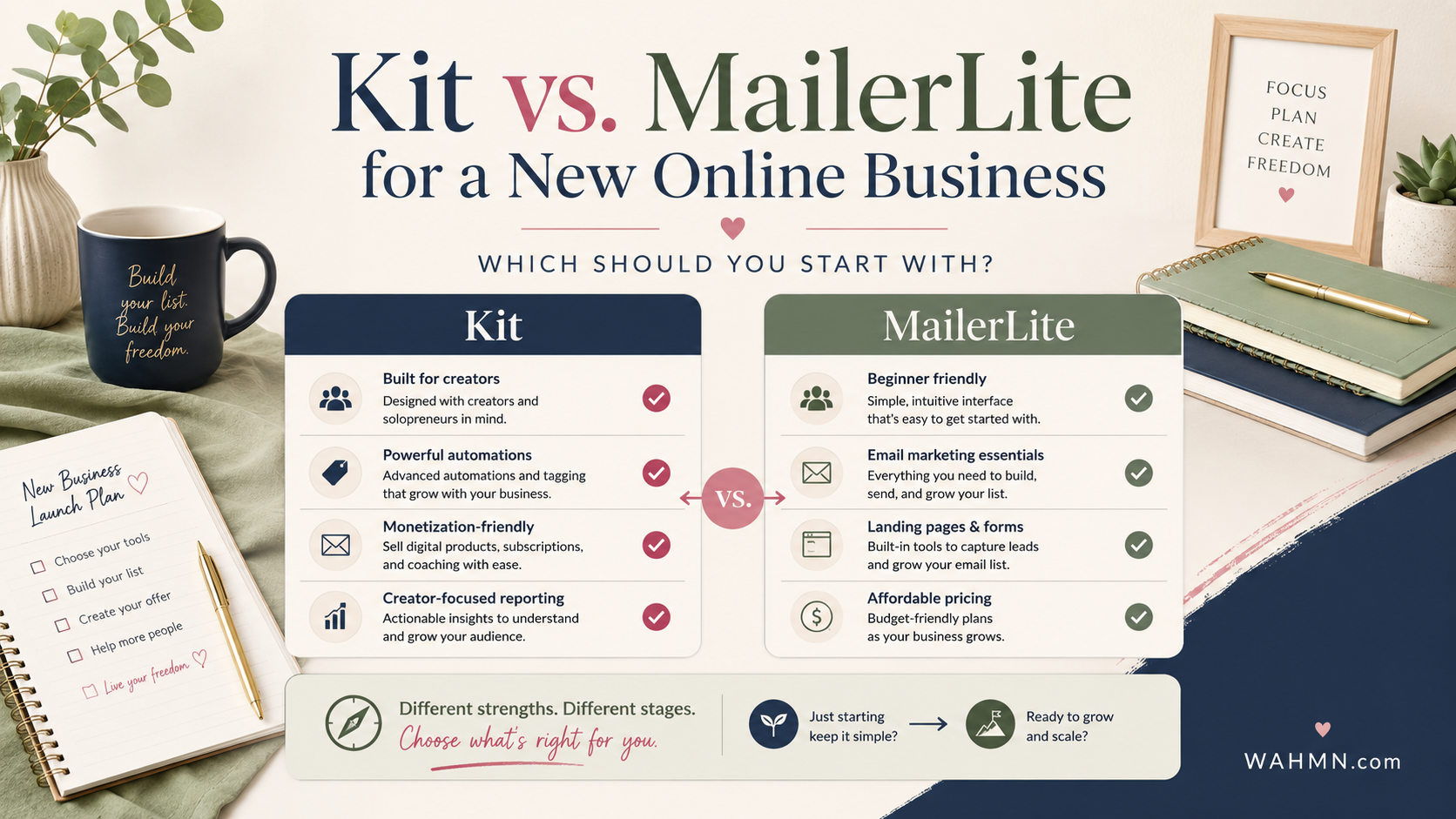
When you look at the Kit vs MailerLite debate, the best choice depends on your specific goals. Both platforms offer powerful tools for creators, but they cater to different business needs. Understanding these core differences early on saves you time and effort as your brand grows.
The following table highlights how these two services stack up across essential categories. Use this data to determine which platform aligns with your current technical skills and long-term vision.
| Feature | Kit | MailerLite |
|---|---|---|
| Ease of Use | Moderate | High |
| Email Design | Text-focused | Drag-and-drop |
| Automation | Advanced | Visual builder |
| Digital Sales | Built-in | Add-on |
If you are still weighing the Kit vs MailerLite decision, consider these primary takeaways for your online business:
- MailerLite is often better for beginners who want beautiful, visual email designs without a steep learning curve.
- Kit excels for creators who prioritize text-based communication and complex automation workflows.
- Both platforms offer scalable pricing, but they handle digital product sales and landing pages in very different ways.
Ultimately, your choice should reflect whether you value design flexibility or advanced marketing logic. By identifying your priorities now, you ensure your email strategy supports your business goals effectively.
ConvertKit is now Kit
Navigating the world of email marketing software can feel tricky when a brand suddenly updates its identity. If you are currently researching the best tools for your business, you might encounter both “ConvertKit” and “Kit” in your search results. It is important to know that these two names refer to the exact same platform.
The company recently rebranded to Kit to better reflect its mission of helping creators grow. While the name has changed, the core features that made the platform popular remain intact. When you look at a ConvertKit vs MailerLite comparison, you are essentially evaluating the same service under its new branding.
You may still see older articles or tutorials using the original name. Do not let this cause confusion during your decision-making process. The ConvertKit vs MailerLite debate remains a top priority for new business owners seeking reliable automation and list-building tools.
| Feature | Old Branding | New Branding |
|---|---|---|
| Primary Name | ConvertKit | Kit |
| Search Context | Historical Data | Current Industry Standard |
| Comparison Term | ConvertKit vs MailerLite | Kit vs MailerLite |
Which is easier for a beginner?
If you are new to digital marketing, deciding between Kit or MailerLite can feel like a major hurdle. Every entrepreneur has a different comfort level with technology, so the “easiest” platform often depends on your specific goals. Some users prefer a clean, visual interface, while others prioritize a text-focused workflow that keeps things simple.
MailerLite is widely recognized for its intuitive drag-and-drop editor. It provides a visual experience that helps beginners see exactly how their emails will look before they hit send. The terminology is straightforward, making it a great choice for those who want to build professional newsletters without a steep learning curve.
On the other hand, Kit offers a more streamlined, minimalist approach. It focuses heavily on the creator economy, stripping away complex design elements to help you connect with your audience through clear, readable text. Choosing between Kit or MailerLite often comes down to whether you value visual design or a distraction-free writing environment. Neither one fills a list on its own, so it is worth reading how to create a lead magnet with AI before you sign up.
When you are just starting, you need a tool that offers plenty of guidance. Both platforms provide helpful tutorials, but their focus differs. MailerLite excels at visual walkthroughs, while Kit provides excellent resources for creators who want to grow their subscriber lists through content-led strategies.
| Feature | MailerLite | Kit |
|---|---|---|
| Primary Focus | Visual Design | Creator Growth |
| Editor Style | Drag-and-Drop | Minimalist/Text |
| Best For | E-commerce/Visuals | Writers/Creators |
| Ease of Use | High | High |
Ultimately, your decision regarding Kit or MailerLite should align with your business model. If you plan to sell products that require heavy visual branding, MailerLite might feel more natural. If you are building a personal brand based on your writing, you may find that Kit helps you move faster.
Email design
Your choice of email marketing platform significantly impacts how your brand appears in the inbox. Whether you prefer a clean, minimalist look or a vibrant, image-heavy layout, the tools you use will dictate your creative freedom.
Kit is built primarily for creators who value simplicity and high deliverability. Its approach to email design focuses on text-based messages that feel like a personal letter from a friend. This style often leads to higher engagement because it avoids the “promotional” look that can trigger spam filters or cause subscribers to tune out.
On the other hand, MailerLite offers a robust drag-and-drop editor that makes email design accessible to everyone. You can easily add columns, buttons, product blocks, and social media feeds to your newsletters. This visual-first approach is perfect for e-commerce brands or businesses that rely on showcasing products to drive sales.
Choosing the right email marketing platform depends on your specific publishing workflow. If you want to write quickly and hit send, the streamlined interface of Kit is hard to beat. If you enjoy crafting beautiful, branded newsletters that mirror your website’s aesthetic, MailerLite provides the necessary flexibility.
| Feature | Kit | MailerLite |
|---|---|---|
| Primary Focus | Text-based/Personal | Visual/Newsletter |
| Editor Type | Minimalist/Plain | Drag-and-Drop |
| Best For | Writers & Coaches | E-commerce & Brands |
| Customization | Limited | Extensive |
Forms and landing pages
When you launch a new business, your ability to capture leads depends heavily on your choice of signup forms and landing pages. These tools act as the front door to your brand, turning casual website visitors into loyal subscribers.
Comparing MailerLite vs Kit reveals distinct approaches to how you collect new subscribers. Both platforms offer user-friendly builders, but they cater to slightly different creative needs.
MailerLite is often praised for its visual-first approach. It provides a wide variety of pre-designed templates that look professional right out of the box. If you want to drag and drop elements to create a beautiful page without touching code, this is a strong contender.
Kit, on the other hand, focuses on simplicity and speed. Its landing pages are designed to be clean and distraction-free, which often helps with conversion rates. The platform prioritizes the message over complex design elements.
Consider these key differences when choosing your tool:
- MailerLite offers more design flexibility for those who want a branded, visual experience.
- Kit excels at creating fast, text-focused pages that are perfect for content creators.
- Both platforms allow you to embed signup forms directly into your existing website.
Ultimately, the best choice in the MailerLite vs Kit debate depends on your specific goals. If you need highly customized landing pages to match a specific aesthetic, MailerLite might be your best bet. However, if you prefer a streamlined process that lets you focus on writing, Kit is an excellent partner for your growth.
Automation
Choosing between ConvertKit vs MailerLite often comes down to how you want to handle your email automation. Both platforms offer powerful ways to send messages to your subscribers without requiring you to be at your computer 24/7.
For a new business owner, the most important tool is a reliable autoresponder. This feature allows you to send a welcome sequence automatically the moment someone joins your list. You can share your story, provide value, and introduce your products immediately.
Email automation does not have to be complicated to be effective. You can start with a simple series of three or four emails that guide your new subscribers through your brand journey. This consistency builds trust and keeps your business top-of-mind.
Both platforms use tagging and segmentation to help you organize your audience. Tagging allows you to track specific interests, such as who clicked a link about a specific product or who signed up via a particular landing page. This ensures that your future messages reach the right people at the right time.
You do not need to build an advanced system on day one. Start with basic triggers that respond to subscriber actions, such as signing up or downloading a free guide. As your business grows, you can add more complex steps to your workflows to better serve your community.
Selling digital products
If you are building a creator business, choosing between Kit or MailerLite often comes down to how you sell your digital products. While both platforms allow you to send emails, they offer different levels of support for turning subscribers into paying customers.
Kit was built specifically for creators who want to sell items like ebooks, templates, or paid newsletters directly through their email platform. It simplifies the process by keeping your product hosting and your email list in one place. This streamlined approach is perfect for those who want to avoid managing multiple software subscriptions.
MailerLite takes a slightly different path by focusing on a broader commerce-focused business model. It provides robust tools for building landing pages and managing complex sales funnels. If your creator business requires deep integration with external e-commerce platforms, MailerLite offers excellent flexibility.
When you prepare to launch your digital products, consider these essential features:
- Automated delivery: Ensure your customers receive their files immediately after purchase.
- Audience segmentation: Tag buyers so you can send targeted follow-up emails later.
- Launch sequences: Use pre-built templates to build anticipation before your product goes live.
Ultimately, the choice between Kit or MailerLite depends on your technical comfort level. If you prefer an all-in-one solution that handles the heavy lifting, Kit is a strong contender. If you need a versatile tool that grows with a complex, multi-channel store, MailerLite might be the better fit for your long-term goals.
Pricing
Choosing between Kit vs MailerLite often comes down to how you balance current costs with future growth. When you are just starting, every dollar counts toward your bottom line. It is easy to get distracted by the lowest monthly fee, but you should look at the total value provided by each platform.
When evaluating email marketing pricing, consider how your costs will change as your subscriber list grows. Some platforms offer a generous free tier that helps you get started without immediate pressure. However, you must check if the features you need, such as advanced automation or specific landing page templates, are locked behind a paid subscription.
Kit vs MailerLite pricing structures differ significantly in how they handle scaling. While one might be cheaper for a small list, the other could offer better long-term value as your business becomes more complex. Always look at the cost per subscriber and the features included in each tier to ensure you are not overpaying for tools you do not use yet.
The following table highlights the key differences in how these platforms approach their service tiers to help you make an informed decision.
| Feature | Kit | MailerLite |
|---|---|---|
| Free Tier Availability | Limited features | Robust basic tools |
| Scaling Cost | Based on subscriber count | Tiered volume pricing |
| Advanced Automation | Included in paid plans | Available in higher tiers |
| Best Value For | Creators and influencers | Small business owners |
Ultimately, the right choice for your email marketing pricing strategy depends on your specific business goals. If you prioritize simplicity and low entry costs, one platform may stand out. If you need complex sales funnels immediately, the investment in a more robust plan might be worth the extra cost. Focus on the tools that help you generate revenue rather than just the monthly bill.
What happens as the business gets more complicated?
Choosing between Kit or MailerLite requires looking beyond your current subscriber count. While both platforms handle basic newsletters with ease, the real test arrives when your operations begin to expand. You must consider how your chosen tool will support your long-term vision.
As your business growth accelerates, you will likely move from sending simple updates to managing complex funnels. You might start offering multiple lead magnets to attract different audience segments. This shift requires a platform that keeps your data organized without creating a mess of manual tasks.
True marketing scalability depends on how well your software handles automation. When you launch a new digital product, you need sequences that trigger based on specific user behaviors. A robust system allows you to nurture leads automatically while you focus on creating high-quality content.
If you find yourself juggling dozens of tags and custom fields, the platform you choose becomes your most important asset. Whether you prioritize the creator-focused features of Kit or the visual design flexibility of MailerLite, ensure the tool can grow alongside your revenue. Making the right choice now prevents the headache of migrating thousands of subscribers later.
| Feature | Kit Capability | MailerLite Capability |
|---|---|---|
| Advanced Segmentation | High (Tag-based) | Moderate (Group-based) |
| Automation Complexity | High (Visual Workflows) | Moderate (Logic-based) |
| Marketing Scalability | Excellent for Creators | Excellent for E-commerce |
| Product Launch Tools | Native Integration | Third-party reliant |
When Kit is better
If you are building a business centered on your personal brand, Kit might be your best ally. This platform shines when your primary goal involves deep audience engagement and selling digital goods. Many users find that creator-focused email marketing is the core of their growth strategy.
When evaluating the ConvertKit vs MailerLite landscape, Kit stands out for those who prioritize simplicity in their sales funnels. It allows you to build complex automation sequences without needing a degree in computer science. This makes it a powerful tool for writers, podcasters, and course creators who want to spend more time creating content.
Choosing Kit for creators is often the right move if you plan to launch paid newsletters or digital downloads early on. The platform integrates these features natively, which reduces the need for third-party plugins. This streamlined approach helps you maintain a professional look while scaling your business.
Consider the following comparison to see if your business needs align with these specific strengths:
| Feature | Kit Strength | Best For |
|---|---|---|
| Automation | Visual Builder | Complex Funnels |
| Digital Sales | Native Integration | Course Creators |
| Audience Growth | Creator Network | Brand Building |
Ultimately, the ConvertKit vs MailerLite debate comes down to your specific workflow. If you value a platform that grows alongside your digital product business, Kit offers a robust environment. It remains a top choice for those who view creator-focused email marketing as the heartbeat of their online presence.
When MailerLite is better
MailerLite often stands out as the superior choice for business owners who prioritize visual design and ease of use. While some tools focus heavily on text-based workflows, this newsletter platform excels at providing a polished, intuitive experience right from the start.
Choosing MailerLite for beginners is a smart move if you want to launch your marketing efforts without a steep learning curve. The interface is clean, and the drag-and-drop editor allows you to build professional emails in minutes rather than hours.
“Simplicity is the ultimate sophistication, especially when you are trying to grow a new business from the ground up.”
When comparing MailerLite vs Kit, the primary difference lies in the visual approach. MailerLite provides a comprehensive toolkit that feels cohesive for those who are not yet ready to manage complex creator-focused systems. You get access to several essential features in one place:
- Drag-and-drop landing page builder for quick lead capture.
- Pre-designed templates that look great on mobile devices.
- Built-in pop-ups and embedded forms to grow your subscriber list.
- An easy-to-navigate dashboard that keeps your analytics front and center.
If your goal is to get your brand online quickly, MailerLite for beginners offers a faster path to execution. It removes the technical friction that often stalls new entrepreneurs. By choosing this newsletter platform, you gain a reliable partner that scales as your business needs evolve.
Ultimately, the MailerLite vs Kit debate comes down to your personal workflow preferences. If you value a visual-first environment and a straightforward setup, MailerLite is likely the better fit for your current stage of growth.
When neither is right
Sometimes, Kit or MailerLite is simply not the right fit for your growing company. While these platforms serve many creators well, they may not satisfy every unique business model or specific marketing goal.
You might find that your business requirements involve highly specialized ecommerce functions. If you manage complex inventory systems or require deep integration with enterprise-level software, you may need a more robust solution.
Advanced customer relationship management and complex sales operations often demand tools with greater depth. When your workflows involve unusually sophisticated automation, standard email platforms can feel restrictive.
In these cases, you should explore other email marketing alternatives that offer enterprise-grade features. Do not feel pressured to choose a platform solely because it appears in a direct comparison article.
Taking the time to audit your technical needs ensures you select a tool that truly supports your long-term growth. Your choice should always align with your specific operational reality rather than popular trends.
What WAHMN would choose at four stages
WAHMN offers a unique perspective on the Kit vs MailerLite debate based on your current business stage. Choosing the right tool is not about finding the “best” software, but rather finding the one that fits your specific goals. These email platform recommendations are designed to help you scale effectively without overpaying for features you do not yet need.
Here is how we view the progression of an online business across four distinct stages:
- Stage 1: The Launch Phase. You are just starting and need simplicity. MailerLite is often the winner here because of its intuitive drag-and-drop editor and generous free tier.
- Stage 2: The Growth Phase. You are building a consistent audience. At this point, you might prefer Kit if you plan to focus heavily on text-based newsletters and creator-focused growth tools.
- Stage 3: The Scaling Phase. You are selling digital products. Both platforms perform well, but Kit offers deeper integration for creators who want to manage their entire business ecosystem in one place.
- Stage 4: The Enterprise Phase. You have complex automation needs. If your business requires highly specific tagging and advanced segmentation, the choice depends on your budget and technical comfort level.
To help you visualize these choices, we have summarized our findings in the table below. This comparison highlights which tool aligns best with your current operational requirements.
| Business Stage | Primary Focus | Recommended Tool |
|---|---|---|
| Launch | Design & Ease | MailerLite |
| Growth | Content Strategy | Kit |
| Scaling | Product Sales | Kit |
| Enterprise | Complex Logic | MailerLite/Kit |
Ultimately, your choice between Kit vs MailerLite should remain flexible. As your business evolves, your email platform recommendations may shift. WAHMN suggests starting with the tool that feels most comfortable today, knowing that you can always migrate as your needs become more sophisticated.
Migration considerations
Choosing an email provider is a big step, but it does not have to be a permanent one. Many entrepreneurs worry that picking the wrong platform will lock them into a difficult situation forever. However, email platform migration is a standard part of growing a digital business.
When you look at the MailerLite vs Kit debate, remember that your choice today does not prevent future changes. You can move your audience if your business needs evolve. The most important part of subscriber migration is ensuring that your data remains clean and organized during the transition.
You must carefully export your subscriber lists, including all existing tags and custom fields. While you can move your contact list, you cannot simply copy and paste your automated workflows or landing page designs. These elements usually require a manual rebuild to ensure they function correctly in the new environment.
Always review your consent records before moving your list to a new provider. Maintaining high deliverability depends on having a healthy, engaged audience that has opted into your communications. Take the time to audit your list and remove inactive subscribers during the move to improve your sender reputation.
| Migration Element | Complexity Level | Action Required |
|---|---|---|
| Subscriber Data | Low | Export and Import CSV |
| Tags and Groups | Medium | Re-map to new system |
| Landing Pages | High | Manual Rebuild |
| Automations | High | Re-create logic flows |
Planning your move in advance makes the process much smoother. Whether you are moving from MailerLite vs Kit or vice versa, focus on preserving your subscriber relationships. A deliberate approach ensures that your email platform migration supports your long-term goals without disrupting your connection with your audience.
FAQs
Choosing between platforms often leads to specific questions about your unique business needs. This Kit vs MailerLite FAQ helps clarify your path forward.
Is it hard to switch platforms later? Moving your subscriber list is a standard process for most email service providers. You can export your data from one tool and import it into another with ease.
Which option is better for a total beginner? MailerLite often feels more intuitive for those who prioritize visual design and simple drag-and-drop builders. Kit provides a stronger foundation for creators who plan to sell digital products or courses early on.
Does the ConvertKit vs MailerLite debate change based on budget? Both services offer free tiers to help you start without upfront costs. Your choice should depend on which features you value most as your list grows.
Are you still unsure about your pick? Deciding between Kit or MailerLite comes down to your specific goals for growth. Take a moment to sign up for a free account on both platforms to test the interface yourself. Hands-on experience remains the best way to see which tool fits your workflow.
Which is more beginner-friendly, Kit or MailerLite?
How does Kit vs MailerLite pricing compare for those on a tight budget?
Why do some people still call it ConvertKit vs MailerLite?
Can I sell products like e-books directly through Kit or MailerLite?
Which platform is better for beautiful, visual email designs?
Is it difficult to switch if I change my mind later?
Do both platforms offer automation on their free plans?
The platform matters far less than what you send. Email Marketing System covers the writing and the sequences that earn money on either one.
Keep reading on WAHMN
More articles in this category, browse the full article library, or explore our business tools and learning paths.