Best AI Tools for a One-Person Business: What to Use and What to Skip
In this article
- Start With the Work, Not the Software
- Best General AI Assistant: ChatGPT
- Best for Long Documents and Careful Review: Claude
- Best for Google Workspace Users: Gemini
- Best for Working With Your Own Materials: Gemini Notebook
- Best for Visual Content: Canva
- Best for Building a Website or Web App Without Traditional Coding: Lovable
- Best for Code-Level Work: Cursor
- Best Visual Automation Tool: Make
- Best for Email and Automated Delivery: Kit
- Best for Video and Audio: Descript
- Best Additional Writing Check: Grammarly
- The Starter Stack for Your Business Model
- How to Build Your Own Cloud App
- What a New Business Can Usually Skip
- How to Decide Whether a Tool Is Worth Paying For
- Protecting Business and Client Information
- What This Article Cannot Do for You
- Frequently Asked Questions
- What This Actually Changes
Running a one-person business means doing work that would normally be split among several employees. You are the strategist, writer, researcher, designer, marketer, customer service department, bookkeeper, and technology manager, sometimes inside the same afternoon.
Finding the best AI tools helps with that, but only when a tool reduces the amount of work you have to manage. A subscription that saves ten minutes and adds a dashboard, a workflow, and a monthly bill has not necessarily improved anything.
We have personally used every tool in this article, although some play a much larger role in our business than others. What follows is what each one is genuinely good at, where it falls short, and which ones you can postpone. A few of the recommendations are not standalone AI tools at all. They are here because they do the operational work that AI creates but cannot finish on its own. We have also left pricing out on purpose, because it changes faster than we can keep an article accurate. Check each company’s pricing page before you buy, and read our breakdown of what a low-cost home business really costs to start for how to budget for software overall.
Start With the Work, Not the Software
There is no single AI tool that is best at everything. The useful question is not, “What should I buy?” It is, “What work do I need help completing?” For most solo businesses the answer falls into a handful of jobs: thinking through decisions, writing and revising, researching current information, making graphics, building a website or an app, connecting systems together, and managing an email list. One tool often covers several of those, so you rarely need a separate subscription for each.
The goal is the smallest set of tools that covers the work your business actually performs. Here is the short version before the detail.
| What you need | Best starting option | Main reason |
|---|---|---|
| General business assistance | ChatGPT | Broad and beginner-friendly |
| Long documents and critique | Claude | Strong sustained document work |
| Work inside Google Workspace | Gemini | Assists within your existing files |
| Current research | Perplexity | Source-focused web research |
| Your own source library | Gemini Notebook | Answers grounded in your materials |
| Graphics and downloads | Canva | Creates finished business assets |
| Website or web app | Lovable | Builds from plain-language instructions |
| Direct code changes | Cursor | Works inside the actual codebase |
| Multistep automation | Make | Visual control over complex workflows |
| Simple app connections | Zapier | Faster beginner setup |
| Email delivery | Kit | Manages subscribers and automations |
| Video and audio | Descript | Transcript-based editing |
| Everyday proofreading | Grammarly | Works where you are already writing |
Everything below is organized by the job, not by the brand.
Best General AI Assistant: ChatGPT
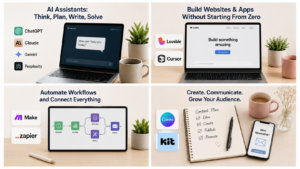
ChatGPT is the easiest place to start when you want one tool that helps with many kinds of work. You can describe what you need in ordinary language without learning an interface first.
The same subscription can help you draft a product description, build a launch checklist, analyze customer feedback, plan a newsletter, rewrite a confusing web page, review a spreadsheet, and think through a software decision. That range is what makes it easier to justify than a narrow tool that does one small thing.
How to get more out of it
ChatGPT works best when you treat it as a capable assistant rather than an oracle. Give it the background, the goal, the audience, the constraints, an example of what good looks like, and the standard you are holding it to. Then review the result the way you would review work from a new hire.
The real gains come from reusable instructions. Once you have written your brand voice, your editorial standards, your product description format, your customer response rules, and your article review checklist, you stop re-explaining yourself every session. That single habit does more for output quality than any tool upgrade.
If you want a running start, our free 1,000 AI Prompts is the prompt library we built for our own business, organized by the jobs in this article. It is the fastest way to stop starting from a blank box every time.
Where it falls short
ChatGPT produces confident errors. It generates weak assumptions, repetitive prose, and citations that look real. It also writes polished but generic copy when the prompt lacks a real point of view or actual source material.
The fix is not avoiding the tool. It is better inputs and a required review step. Never assume a citation, statistic, legal explanation, financial figure, medical claim, or software instruction is correct because it reads convincingly. Verify anything consequential against a primary source.
Our take: A strong first choice for an owner who wants one flexible assistant and does not yet know which specialized tools she will need.
Best for Long Documents and Careful Review: Claude
Claude is a strong alternative or companion when your work involves long articles, reports, course lessons, product manuals, detailed critiques, large instruction sets, or extended document revision.
We reach for it when we want the AI to read a substantial amount of material before responding, and when we want critique rather than agreement. Asking it to find weak assumptions, conflicting instructions, missing steps, unsupported claims, and places a reader will get confused produces genuinely useful notes. That is a different job from drafting, and it is the one Claude does best for us.
ChatGPT or Claude?
There is no honest universal answer, but there is a practical one. Choose ChatGPT first if you want a broad all-purpose assistant, image and varied media work, a simple starting experience, and one central place for everyday AI tasks. Choose Claude first if long-form writing, analysis of lengthy documents, detailed critique, and complex written planning dominate your week.
Some owners pay for both and use them as a two-stage system, where one drafts and the other challenges the draft. That is a legitimate workflow, and it is not where a new business should start. One paid general assistant is enough until the second produces a clear, measurable advantage you can point to.
Our take: Consider Claude when long documents, curriculum, or detailed review are central to the business. Do not pay for both because other people do.
Best for Google Workspace Users: Gemini
Gemini is Google’s general assistant and the third real option in this category. Its clearest advantage is location. On eligible Google Workspace and Google AI plans, Gemini works inside tools such as Docs, Sheets, Gmail, and Drive rather than requiring you to move everything into a separate window, and that removes more friction than a feature-by-feature comparison might suggest. Check what your own plan includes before counting on any particular integration, because access varies by account type.
Worth clearing up one point of confusion, because the names invite it. Gemini and Gemini Notebook are different products. Gemini is the general assistant described here. Gemini Notebook, covered below, answers from a defined collection of sources in a notebook rather than working as a general-purpose assistant.
Our take: The most natural first choice when your daily work already lives inside Google Workspace and your plan includes the integrated features you need. The rule still holds. Pick one general assistant and learn it properly rather than keeping three open and mastering none.
Best for Working With Your Own Materials: Gemini Notebook
Gemini Notebook is Google’s source-grounded research tool. It was called NotebookLM until Google renamed it on July 16, 2026, keeping it as the same standalone research product. Existing notebooks, shared links, and sources carried over, and the app’s address later moved to notebook.google.com.
The distinction that matters is grounding. Instead of asking an AI to answer from everything it absorbed in training, you give it a defined set of materials and ask questions about those. That makes it strong for building a report from several sources, turning internal documentation into a training guide, summarizing a batch of customer interviews, drafting an FAQ page from real support tickets, or planning content from research you already did.
You still have to inspect the originals. Source-grounded AI can misread a document, miss an exception, or summarize away the qualification that made the sentence true.
Our take: Useful when you work with large collections of documents and need a reliable way to question and organize them.
Best for Visual Content: Canva
Canva stays in our stack because it finishes the asset. Design, brand kits, templates, stock assets, basic video, and social scheduling live in one place, which matters more than raw image quality for a solo owner.
A dedicated AI image generator may produce a striking picture. But a business owner needs to crop it, add a headline, resize it for Pinterest, place it in a presentation, build a matching product cover, and keep all of it consistent with your brand. Canva covers that whole chain. If Pinterest is a traffic channel for you, this is where your pin production will live, and our Pinterest Profit System course covers the design and posting system in depth.
Templates also solve the blank page problem. A non-designer can start with a workable layout and change the colors, fonts, photos, and spacing from there. The limitation is that easy design software does not produce good design on its own. Crowded pages, weak contrast, tiny type, and inconsistent branding still make a business look unprofessional. Treat templates as a foundation, not a substitute for judgment.
Our take: One of the easiest tools to justify for a content-based business that creates regular graphics, products, or social material.
Best for Building a Website or Web App Without Traditional Coding: Lovable
Lovable lets you describe a website or web application in plain language and generates a working project. That covers more than an informational site. Depending on the project it can produce a customer portal, a directory, a quiz, a dashboard, a searchable library, a calculator, a lead management tool, a membership area, or a database-backed internal system.
We have built sites with it, and the experience changed how we think about who can build online. There was no blank coding screen and no requirement to make every technical decision up front. We described the site, reviewed what came back, and refined it through instructions.
What “in the cloud” actually means for you
Traditional software runs on one computer. A cloud application runs on remote infrastructure and is reached through a browser, so you can use it from any machine and give customers or contractors controlled access.
That does not make it maintenance-free. A live app still needs attention to security, backups, user permissions, data handling, error monitoring, usage costs, and what happens if the platform changes its terms.
Before you publish anything AI built
We do not publish a generated site without checking mobile layout, navigation, button behavior, forms, search visibility, accessibility, legal pages, privacy policy, checkout flow, image licensing, and any claims or testimonials on the page. Lovable shortens the distance between an idea and a working project. It does not transfer responsibility for what goes live.
Lovable or a traditional website builder?
WordPress, Squarespace, Wix, or Shopify may still be the better choice when the functions you need already exist, when a mature plugin ecosystem matters, when you need a standard online store, when contractors already know the platform, or when long-term portability is a priority. Lovable becomes the better choice when you want the site to behave like custom software rather than a set of pages.
Our take: One of the most interesting options for a nontechnical owner with an idea that needs custom behavior. Start with a contained project rather than moving a critical business system into an untested app.
Best for Code-Level Work: Cursor
Cursor is an AI-assisted code editor built for working inside a real software project rather than discussing code in a chat window. It can create files, write and modify code across connected files, explain an existing codebase, find errors, and run agent-assisted development tasks.
We have used it to build an application from scratch without knowing how to write the required code. That is real leverage, and it comes with a real warning attached.
The risk a beginner needs to understand
AI-generated code can contain security weaknesses, fragile shortcuts, poor database rules, exposed credentials, broken error handling, and features that work in one situation and fail in another. It can also reference software packages that do not exist.
That last one is a documented supply-chain risk rather than a theoretical possibility. A 2025 security study generated 576,000 code samples across sixteen models and found that at least 5.2 percent of the packages recommended by commercial models did not exist, along with 21.7 percent from open-source models, producing more than 205,000 unique invented package names. The attack that follows is simple. Someone registers the invented name, fills it with malicious code, and waits for the next person to install it. A 2026 follow-up found newer models had improved while the underlying risk remained.
The practical safeguard is simple. Before installing any package an AI suggests, confirm it exists, comes from the publisher you expect, and has a legitimate history.
Beyond that, keep the project under version control, test changes before deploying, never put secret keys directly in code, keep backups, and get qualified review before the application touches sensitive customer or financial data.
Sources: Spracklen et al., “We Have a Package for You!”, USENIX Security Symposium 2025. Follow-up figures from a 2026 arXiv preprint, “The Range Shrinks, the Threat Remains”, which has not been peer reviewed.
Cursor or Lovable?
Lovable is easier when you want to describe a web application and have it built and hosted through one visual service. Cursor gives you direct control over the code itself, which matters when you already have an application, need deeper customization, want to own the codebase, or need more than a visual builder allows. They also work together. A project can start in Lovable, sync to a code repository, and be modified in Cursor later.
Our take: Cursor gives a determined non-programmer remarkable reach. It is not risk-free coding without knowing anything. Use it first on internal tools, prototypes, and low-stakes projects while you build stronger review habits.
Best Visual Automation Tool: Make
Make is a visual automation platform that connects applications and moves information through a series of steps. Instead of writing a program, you arrange modules on a canvas and show the system what should happen.
We have built multistep processes in it, and the visual structure is what made it work for us. Rather than imagining an invisible chain of logic, we could watch information move from one module to the next, inspect where it changed shape, and see exactly which step failed. That does not remove the learning curve, but it makes a complex system understandable.
What a scenario looks like in practice
A single automation might take a form submission, add it to a spreadsheet, create the contact in your email platform, apply a tag, generate a draft with AI, save that draft to a document, add a task to your project manager, and notify you if any step fails. The value is not in any one action. It is in the chain running reliably without you.
Build it with failure in mind
Every automation we keep in production has six parts defined before it goes live: the trigger, the conditions that must be true, the action, the exception path when they are not, the confirmation that it worked, and the fallback when it did not. Scenarios that skip the last three are the ones that fail silently for three weeks.
We also sort automations by risk before turning anything loose. Low risk means the output comes back to you for review. Medium risk means it goes out but is recoverable. High risk means it touches customers, money, or permanent records. Your first unattended automation should be a low-risk one, and anything high-risk should run supervised several times before you stop watching it. That sorting rule is one we teach in full in The AI Advantage Blueprint, because it is the difference between an automation that saves you time and one that quietly damages something while you are not looking.
Make or Zapier?
Zapier is faster for a beginner who wants a straightforward connection between two common apps. Make is better when the process has several steps, multiple possible paths, data that needs transforming or filtering, or a structure you want to see rather than imagine.
Choose Zapier for simple automations where setup speed matters most. Choose Make when you are building a system rather than a shortcut. Do not pay for both until you have a specific reason.
The part that is not software
Automation begins with a stable process, not a tool. When the underlying process is confused, automation makes the confusion run faster.
Before you build anything, write down what starts the process, what information enters, what decisions have to be made, what happens next, what can go wrong, who needs to know, where the final record lives, and how you will know it completed correctly. If you cannot answer those in writing, the process is not ready to automate.
Our take: Strong for an owner with a real multistep process and the patience to learn the system. Build one useful scenario, test it hard, and expand only after it runs reliably.
Best for Email and Automated Delivery: Kit
Kit is an email marketing and creator platform rather than an AI tool, and it earns its place because AI cannot do this part. Your assistant can draft a welcome sequence. It cannot store subscriber permission, send the messages, handle unsubscribes, or apply automation rules.
A solo business uses Kit for signup forms, landing pages, lead magnet delivery, newsletters, welcome sequences, tagging, segmentation, visual automations, and selling digital products. Where AI fits is upstream. Use it for the strategy, the first drafts, subject line options, segmentation ideas, and campaign analysis, and let Kit do the operational work.
Kit also connects to Make or Zapier, which is where product delivery gets automatic. A purchase triggers the automation, the buyer is added and tagged, the correct delivery sequence fires, and the sale is recorded in your tracking system without you touching it.
Our take: A strong fit for creators, digital product businesses, and newsletters. More than a service business needs if email marketing is not yet part of the plan.
Best for Video and Audio: Descript
Descript lets you edit recorded audio and video by editing the transcript. Instead of hunting for every unwanted word on a timeline, you delete the text and the recording follows.
That is genuinely faster for tutorials, course lessons, product demos, podcast episodes, screen recordings, and social clips. It also handles transcription, filler word removal, captions, screen recording, and clip generation.
Automatic transcripts still mishear names, technical terms, numbers, and accented speech, and generated edits can leave unnatural pauses or visual jumps. Review before publishing.
Our take: Worth it when recorded content is a regular output. Unnecessary for an owner who rarely records.
Best Additional Writing Check: Grammarly
Grammarly checks spelling, grammar, clarity, and tone in the places where a chat window is not open: your email client, your browser, your documents, your client messages.
Do you need it if you already have ChatGPT or Claude? Not automatically. A general assistant does deeper editorial work and can explain why something is weak. Grammarly’s advantage is proximity to the writing surface.
Our take: Try the free level first. Upgrade only if the convenience earns its place alongside your other subscriptions.
The Starter Stack for Your Business Model
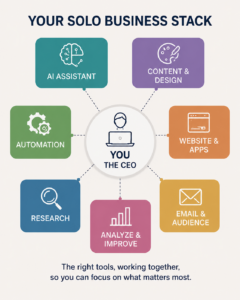
You do not need every tool in this article. Start narrow, and let the work tell you what to add.
A service business starts with one general assistant, Canva, an accounting system, and the email and calendar tools you already have. Add Grammarly if writing quality needs another layer, an automation tool once a process repeats predictably, and Kit when building a list becomes important.
A content or affiliate business starts with one general assistant, Perplexity for research, Canva, Kit, and a publishing platform. Add Descript when video enters the content plan, and Make when publishing, email, and tracking need to talk to each other.
A digital product business starts with one general assistant, Canva, Kit, a checkout and delivery system, and cloud storage. Add Lovable for a custom quiz, portal, or application, and Make for delivery, tagging, and follow-up.
A software or custom tool business starts with one general assistant, Lovable for rapid building, Cursor for code-level work, version control, and a hosting and database arrangement. Add Make for integrations and professional security review before the app handles anything valuable.
If you are building this alongside a job, sequence matters more than selection. Our guide to starting a home business while working full time covers how to stage the setup.
How to Build Your Own Cloud App
The ability to build your own application is one of the most significant changes AI has brought to small business ownership. You can now build a working prototype, test whether it solves the problem, and improve it before making a larger investment.
Define one problem, precisely. Not “I want an app.” Instead: customers need to complete an assessment and receive a tailored result. Or: I need one dashboard tracking leads from four sources. Or: buyers need access to the materials they purchased.
Describe the users and the data. Who uses it, what they can see, what they can change, what goes in, what comes out, where it is stored, which actions need permission, and which information is sensitive. Answering this before you build prevents the rework that kills most first attempts.
Build the narrowest first version. Use Lovable to generate the interface. Build the smallest thing that proves the process works, not the version you eventually want.
Connect the steps. Use Make when the app needs to exchange information with your other systems, such as saving the submission, sending selected fields to an AI model, storing the result, triggering the email, notifying you, and updating the dashboard.
Move to Cursor when the code needs real changes. This is where technical risk increases. Keep backups, use version control, test somewhere safe, and never push unreviewed changes to a system serving customers.
Publish, then monitor. A live application needs ongoing attention to failed automations, user errors, hosting usage, AI costs, security alerts, database growth, broken integrations, backups, and permission settings. Building an app got easier. Operating a trustworthy one is still a business responsibility.
What a New Business Can Usually Skip
Multiple general AI subscriptions. Pick one, learn it properly, and add a second only when it does a recurring job the first handles badly.
A separate AI writing platform. Tools built around marketing workflows have to offer more than a different interface on similar underlying models. If your assistant already produces the writing, the specialized tool needs to save real time or enforce real consistency to earn a second bill.
Enterprise project management. A solo owner does not need departments, approval chains, and workforce planning. A task manager, a calendar, and a spreadsheet will do.
Automation before the process is stable. If the steps change every week you will spend more time repairing the automation than doing the work. Run it manually until it stops changing.
A coding tool with no software project. Cursor is powerful, and it is not a general business requirement. Subscribe when you have code to write or maintain.
A custom app when standard software already works. Before building, ask whether an existing tool solves 80 to 90 percent of the problem. Custom software is worth it when the process is important, unusual, and genuinely hard to run with what already exists.

How to Decide Whether a Tool Is Worth Paying For
Name the task precisely. “Help with marketing” cannot be evaluated. “Turn each approved article into five Pinterest descriptions and save them to a spreadsheet” can. Then work through four questions.
How often does the task occur? A tool used twice a year rarely justifies a monthly subscription. A tool used daily can justify a lot.
How much time will it save after setup? Count the setup and the maintenance. A workflow that saves two hours a month but takes ten hours to build spends five months just recovering the build time, and that is before anything breaks.
Does it improve revenue, quality, or risk? Not every worthwhile tool saves time. Some improve conversion, reduce errors, enforce consistency, prevent missed follow-up, protect records, or make a product possible at all.
Does something you already pay for do it? Overlap is the largest source of wasted software spending in a solo business. Your design tool has AI features. Your assistant makes images. Your email platform includes forms and automations. Your app builder includes hosting. Check before you add.
Then test it on real work. Use the trial for one genuine business task from beginning to end rather than watching tutorials. At the end, ask whether the result was usable, how much correction it needed, whether it was faster than your old method, whether you could repeat it, and whether you would still use it after the novelty wore off.
Protecting Business and Client Information
Privacy terms vary by company, product, plan, and setting, and business plans often provide controls that consumer accounts do not. Some platforms let you disable training on your data. Some publish separate retention terms. Do not assume any two behave alike.
Before you upload anything confidential, read the current privacy policy, review the data controls in your account settings, find out whether your inputs may be used for training, check the retention period, and identify which third-party models receive your data.
Then reduce what you send. Strip personal information the task does not require. Get client permission where it is needed. Paste summaries rather than whole documents when a summary will do. Never paste passwords, API keys, security links, full financial records, medical records, or protected legal information into a general assistant.
Some tools offer privacy modes that exclude your data from training, and those are worth enabling. They still do not secure your code, your credentials, your database, or your deployed application. The standard is not “the vendor says it is safe.” The standard is to send the minimum data the task requires and keep your own controls in place.
What This Article Cannot Do for You
Everything above is selection advice. It tells you which tool fits which job, and that is the easy half.
The hard half is method. Knowing that ChatGPT is a good general assistant does not tell you how to write instructions that produce usable work the first time. Knowing that Make handles multistep automation does not tell you which of your processes is stable enough to automate. Knowing that Lovable builds apps does not tell you whether the app you have in mind is the right thing to build. Most owners who stall with AI have not chosen the wrong tools. They are using good tools without a method, getting mediocre output, and concluding the technology is overrated.
That gap is what we built The AI Advantage Blueprint to close.
What the course is
It is built around one thing: your own business project. You name that project at the start and every module afterward aims at it, so you are not learning AI in the abstract and hoping to apply it later. You are building something real while you learn.
Every lesson ends with a hands-on Build It exercise, and the larger Build Labs produce finished assets you keep. Part I builds AI mastery, from privacy and stronger instructions through business operations, creative work, and power-user methods. Part II applies all of it to the business itself: validating the idea, building the foundation, marketing, creating a product, and automating the operation.
It finishes with a Graduate Report reviewed against four practical checks. Is the project real? Is it specific? Is it yours? Do you understand how you made it? You can submit it for review or complete it self-paced with an outside critique as a second reader.
What it is not
It is not a professional certification. Graduates use the AI Advantage Blueprint Graduate designation, which describes a program you completed and a project you shipped rather than a professional credential, and we are careful to describe it that way. It makes no income claims and sets no timeline for results, because we cannot know your market, your capacity, or your starting point. The worked examples throughout follow a small cast of composite business owners, and several of their attempts fail or land modestly, because that is what actually happens and a course that only shows wins is not preparing you for anything.
If you are ready to stop collecting tools and start building with them, that is what the Blueprint is for.
Frequently Asked Questions
If I can only pick one AI tool, which should it be? A general assistant, either ChatGPT or Claude. Everything else in this article is specialized, and a general assistant is the one that touches the most jobs while you are still learning where AI actually helps your business.
Is Gemini the same thing as Gemini Notebook? No. Gemini is Google’s general AI assistant, comparable to ChatGPT or Claude. Gemini Notebook, formerly NotebookLM, answers from the defined collection of sources in a notebook rather than operating as a general-purpose assistant. The shared name causes a lot of confusion, and the two do different jobs.
Do I have to pay for AI tools to run a small business? No. Most of the tools here offer a free level, and a free level is usually enough to find out whether you will use something regularly. Pay when a tool is doing recurring work, not because a paid plan looks more serious.
Can I really build a website or app without knowing how to code? Yes, with a caveat. Tools like Lovable and Cursor genuinely let a nontechnical owner build working software, and we have done it. You remain responsible for security, backups, permissions, and what happens when something breaks. Start with internal tools and low-stakes projects rather than a system handling customer payments.
Is it safe to put business information into AI tools? It depends entirely on the tool, the plan, and the settings. Read the current privacy policy, check whether your inputs can be used for training, and send the minimum data the task requires. Never paste passwords, keys, or protected client information into a general assistant.
What is the difference between Make and Zapier? Zapier is faster to set up for simple connections between two apps. Make gives you a visual canvas with branching, filtering, and data transformation, which is better when the process has several steps and you need to see where it broke.
Can I learn all this from articles, or do I need a course? You can learn individual tools from articles. What is harder to assemble on your own is a full sequence, one project that develops across the whole program, structured exercises, finished assets, and review checkpoints along the way. If you have been experimenting for months and your output still feels generic, the missing piece is usually method rather than more information. That is what The AI Advantage Blueprint is built around.
What This Actually Changes
AI makes it tempting to collect tools before the business has enough work to need them. That is backward.
Start with the work that is taking too long, costing too much, producing inconsistent results, or blocking the business. Then choose the smallest tool that improves it, and add the next one only when the need is obvious. The most successful one-person business is not the one with the largest AI stack. It is the one running a few well-chosen systems reliably.
You do not need to become a designer to make professional materials. You do not need to be a programmer to test an app idea. You do not need a technical team to connect the parts of your business. You do need to stay responsible for the decisions, the accuracy, the security, and the final quality. That is the honest version of what AI gives a one-person business. It does not remove the owner from the work. It gives her enough leverage to build and run more than one person could manage alone.
Start here
Download the free 1,000 AI Prompts. It is the prompt library we use in our own business, organized by the same jobs covered in this article, and it is the fastest way to put any of this to work today.
Choose your next step
- Ready to master AI properly, on a real project: The AI Advantage Blueprint™
- Still deciding what business fits your life: The Intensive Freedom Path Assessment™
Keep reading on WAHMN
More articles in this category, browse the full article library, or explore our business tools and learning paths.
Tools help, but the judgement is yours. AI Advantage covers using them well, and Business Launcher covers the business they are meant to serve.